
Unlocking Peak Performance: The Unrivaled Advantages of Using Solid State Drives (SSDs)
Are you looking to revolutionize your computing experience? In today's fast-paced digital world, the demand for instant access to data and seamless system operation is paramount. Traditional hard disk drives (HDDs) are increasingly becoming a bottleneck, hindering productivity and user satisfaction. Enter the Solid State Drive (SSD), a transformative storage technology that has redefined what's possible for everything from personal computers to enterprise servers. This comprehensive guide delves deep into the myriad advantages of using Solid State Drives, demonstrating why upgrading to an SSD is not just an improvement, but a fundamental shift towards superior performance, reliability, and efficiency. We'll explore how these advanced storage solutions offer unparalleled speed, durability, power efficiency, and responsiveness, making them an indispensable component for any modern computing setup.
Blazing Fast Speed and Unmatched Responsiveness
The most immediate and impactful advantage of Solid State Drives is their breathtaking speed. Unlike HDDs, which rely on spinning platters and read/write heads, SSDs utilize flash memory to store data, similar to a giant USB stick. This fundamental difference eliminates mechanical delays, allowing for virtually instantaneous data access. The impact on your daily computing is profound and immediately noticeable.
Instant Boot-Ups and Application Loading
- Lightning-Fast Boot Times: Say goodbye to agonizingly slow boot sequences. With an SSD, your operating system can load in mere seconds, often going from a cold start to a fully functional desktop in under 10-15 seconds. This dramatically reduces wasted time and boosts your overall productivity from the moment you power on your machine.
- Rapid Application Launching: Programs and applications that used to take ages to open, especially demanding software like video editors, graphic design suites, or large games, now launch in a fraction of the time. This enhanced application loading speed means less waiting and more doing, streamlining your workflow considerably.
- Seamless File Transfers: Copying large files, whether it's a massive video project or a game library, becomes a breeze. SSDs offer significantly higher read and write speeds compared to HDDs, often reaching speeds of 500 MB/s for SATA-based SSDs and several thousands of MB/s for high-end NVMe SSDs, making data transfers incredibly efficient.
Enhanced System Responsiveness
Beyond just loading times, an SSD fundamentally changes how your entire system feels. Multitasking becomes smoother, switching between applications is instantaneous, and even complex operations requiring frequent data access are handled with remarkable agility. This improved system responsiveness creates a fluid and frustration-free user experience, making your computer feel truly "snappy." The low latency of SSDs means that commands are executed almost immediately, eliminating the lag often associated with traditional hard drives.
Superior Durability and Reliability
Another critical advantage of Solid State Drives stems from their lack of moving parts. This design choice inherently makes them far more robust and reliable than their mechanical counterparts.
Resistance to Physical Damage
- Shock and Vibration Immunity: HDDs are susceptible to damage from drops, bumps, or even strong vibrations, as their delicate read/write heads can crash into the spinning platters. SSDs, being solid-state devices, are immune to these physical shocks. This makes them ideal for laptops, tablets, and any portable device where the risk of accidental drops or movement is high.
- No Mechanical Failures: The absence of motors, spinning platters, and moving heads eliminates the most common points of failure found in HDDs. This significantly reduces the likelihood of catastrophic drive failure due to mechanical wear and tear, leading to a much longer operational lifespan and greater data security.
Enhanced Data Integrity
While all storage devices have a finite lifespan for writes, SSDs are designed with sophisticated wear-leveling algorithms that distribute data writes evenly across all memory cells, maximizing the drive's longevity. This intelligent management, combined with error correction capabilities, contributes to the overall data integrity and reliability of your stored information, giving you greater peace of mind.
Remarkable Power Efficiency and Silent Operation
SSDs are not just about speed and durability; they also contribute to a more efficient and pleasant computing environment.
Lower Power Consumption
Because SSDs don't have motors to spin platters or move read/write heads, they consume significantly less power than HDDs. This translates into several tangible benefits:
- Extended Battery Life: For laptop users, an SSD can noticeably extend your device's battery life, giving you more unplugged working or entertainment time. This makes them a prime choice for enhancing the portability of your computing devices.
- Reduced Heat Generation: Less power consumption means less heat generated. SSDs run cooler than HDDs, which can contribute to a more stable system, reduce the need for aggressive cooling fans, and potentially prolong the lifespan of other components within your computer.
- Lower Energy Bills: While a minor factor for a single drive, across many systems in an enterprise environment, the cumulative energy efficiency of SSDs can lead to substantial savings on electricity costs.
Completely Silent Operation
The whirring, clicking, and grinding noises often associated with traditional hard drives are entirely absent with an SSD. Since there are no moving parts, SSDs operate in complete silence. This is a huge advantage for:
- Quiet Work Environments: Ideal for home offices, recording studios, or any setting where noise reduction is critical.
- Home Theater PCs (HTPCs): Ensures your entertainment experience isn't marred by distracting drive noise.
- Laptops: Contributes to a quieter and more pleasant mobile computing experience.
Compact Form Factors and Versatile Applications
The solid-state nature of SSDs allows for much smaller and more versatile designs compared to bulky HDDs.
Diverse Form Factor Options
SSDs come in various form factors, catering to different needs and device types:
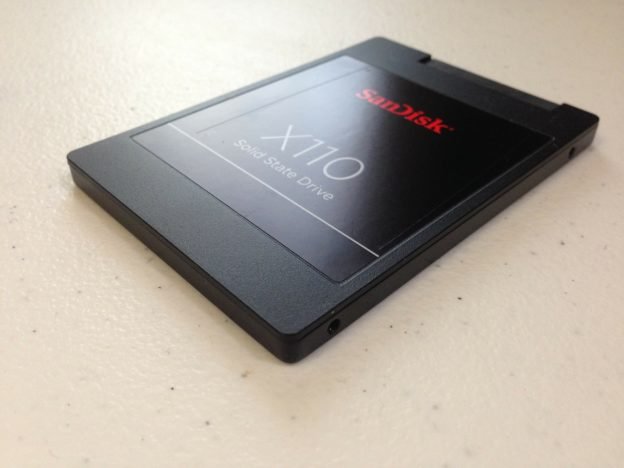
- 2.5-inch SATA SSDs: The most common form factor, easily fitting into laptop and desktop drive bays designed for traditional HDDs. These offer a straightforward upgrade path.
- M.2 SSDs: These tiny stick-like drives are incredibly compact and plug directly into a motherboard slot, making them perfect for ultrabooks, mini PCs, and high-performance desktops where space is at a premium. M.2 drives can be either SATA or NVMe, with NVMe offering vastly superior speeds.
- AIC (Add-in Card) SSDs: Resembling small graphics cards, these high-performance NVMe drives plug into a PCIe slot, offering the highest potential speeds for professional workstations and gaming rigs.
Ideal for a Wide Range of Users
The unique blend of advantages offered by SSDs makes them suitable for virtually every type of computer user:
- Gamers: Experience faster game loading, smoother texture streaming, and reduced in-game lag, leading to a significant gaming performance boost.
- Content Creators: Accelerate video editing, graphic design, and 3D rendering workflows with rapid file access and faster project saves. This dramatically improves the efficiency of your video editing workflow and other demanding creative tasks.
- Business Professionals: Enjoy quick boot times, instant application access, and reliable performance crucial for demanding business applications and virtual meetings.
- Everyday Users: Simply makes your computer feel faster and more responsive for browsing, email, and general productivity, enhancing the overall user experience.
Actionable Tips for Maximizing SSD Benefits
To truly harness the full potential of your Solid State Drive, consider these practical tips:
- Install Your Operating System on the SSD: This is the single most important step. Having your OS, frequently used applications, and games on the SSD will yield the most dramatic performance improvements.
- Enable TRIM: TRIM is a command that helps your SSD manage deleted data blocks more efficiently, preventing performance degradation over time. Most modern operating systems enable TRIM by default for SSDs, but it's worth verifying.
- Avoid Defragmentation: Unlike HDDs, SSDs do not benefit from defragmentation. In fact, defragmenting an SSD can reduce its lifespan by performing unnecessary write cycles.
- Leave Some Free Space: It's generally recommended to leave at least 10-15% of your SSD's capacity free. This allows the drive's wear-leveling algorithms and garbage collection processes to operate optimally, maintaining performance and extending longevity.
- Regular Backups: While SSDs are highly reliable, no storage device is immune to failure. Always maintain regular backups of your critical data to an external drive or cloud storage. Consider a comprehensive storage solution that includes both fast SSDs and larger, more economical HDDs for archival storage.
Frequently Asked Questions About Solid State Drives
What is the primary difference between an SSD and an HDD?
The primary difference lies in their underlying technology. An SSD (Solid State Drive) uses flash memory to store data, similar to a large USB drive, and has no moving parts. This allows for incredibly fast data access, silent operation, and high durability. An HDD (Hard Disk Drive), on the other hand, stores data on spinning magnetic platters accessed by read/write heads. This mechanical nature makes HDDs slower, noisier, and more susceptible to physical damage. The architectural difference is what gives SSDs their significant speed and reliability advantages.
Is upgrading to an SSD really worth the cost?
Absolutely. While SSDs historically had a higher price per gigabyte than HDDs, their costs have significantly decreased, making them an excellent investment for performance. The return on investment (ROI) is immense in terms of increased productivity, reduced frustration, and a vastly improved user experience. For most users, upgrading to an SSD, especially for their operating system and primary applications, offers the most noticeable performance boost for their money. The benefits in terms of boot speed, application loading, and overall system responsiveness far outweigh the initial cost.
How long do Solid State Drives typically last?
The lifespan of an SSD is measured in "terabytes written" (TBW) or "drive writes per day" (DWPD), indicating how much data can be written to the drive before its cells begin to wear out. Modern consumer SSDs are designed to last for many years under typical usage scenarios, often exceeding the lifespan of an equivalent HDD. Thanks to advanced technologies like wear-leveling and over-provisioning, a typical 250GB SSD used for daily computing could theoretically last for decades before reaching its write endurance limit. Therefore, concerns about SSD longevity are largely unfounded for the vast majority of users.
Can I use both an SSD and an HDD in the same computer?
Yes, this is a very common and highly recommended configuration, often referred to as a "hybrid storage setup." Many users opt to install a smaller SSD (e.g., 250GB or 500GB) for their operating system, frequently used applications, and critical games, leveraging the SSD's speed for performance. Concurrently, they use a larger, more affordable HDD (e.g., 1TB or 2TB) for mass storage of less frequently accessed files, such as documents, photos, videos, and archived data. This approach offers the best of both worlds: the blazing fast speeds of an SSD for responsiveness and the ample, cost-effective storage capacity of an HDD for bulk data. It's an ideal strategy for maximizing both performance and storage volume within your system.

0 Komentar